
Inventory Maintenance
Things sure do break a lot!
There are lots of different ways to help us keep the maintenance pile under control, and you don’t need to have any particular area of expertise.
If you have questions or suggestions for improvement on how we deal with maintenance, or just want more information on how to help out, reach out to Jason via slack, or email jason (at chtl.org).
Adding an Item to Maintenance
Section titled “Adding an Item to Maintenance”Using MyTurn (Preferred)
Section titled “Using MyTurn (Preferred)”When it’s determined that an item needs maintenance, please make sure to create a new maintenance log for it in MyTurn. This helps us share information easily and consistently.
Note that it is possible to start a maintenance log for an item, and then remove the “In Maintenance” status for that item. This is useful for situations where the item needs a minor fix or adjustment, but is still usable. For example, a drill bit set with one dull bit.
When maintenance is completed, be sure to press the Complete button to remove the entry from the active maintenance log.
Physical Labeling (Optional)
Section titled “Physical Labeling (Optional)”Optionally, use the yellow maintenance tag, or writing on bright painters tape can be helpful for information at a glance, but please make sure the same information is also logged in MyTurn as described above.
Where to Store Maintenance Items
Section titled “Where to Store Maintenance Items”- Maintenance Cart
- Newly added items that still need triage/investigation
- Maintenance Shelf in Inventory Room
- Items that appear to have an owner, and are just waiting for repair work, parts arrival, etc.
- Upstairs Area
- Items for which we have no clear path forward.
- Items that we have decided to discard (mark with orange tape labeled DISCARD).
Reviewing and Working on Maintenance Items
Section titled “Reviewing and Working on Maintenance Items”Finding Something to Work On
Section titled “Finding Something to Work On”- Grab an item from the cart
- Review the maintenance log
- This is also useful for finding “In Stock” items that just need a little care.
- Ask other volunteers if they have noticed anything that could use some attention.
Updating Status
Section titled “Updating Status”If you make any discoveries, progress on a repair, or just generally have thoughts on how to proceed, please add it to the maintenance log.
The maintenance UI is not the best, some guidelines (see more below).
- One log entry for one issue. If there is already an open maintenance log describing the issue, do not start
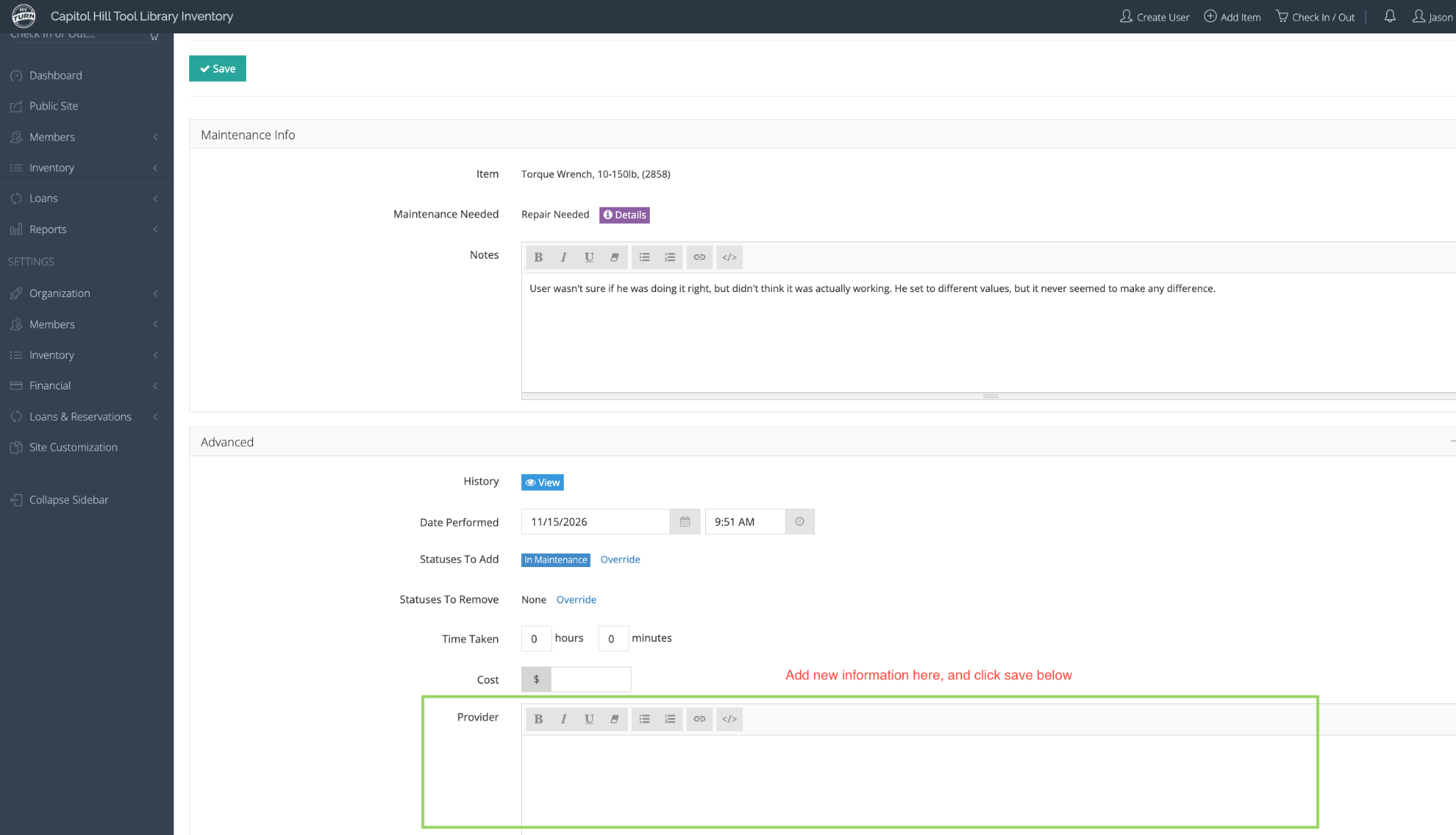
- To add new information, add something in the “Provider” text field under the “advanced” section (don’t worry too much about the other fields). This adds a new entry, with the logged in users name, and the time, and makes it easier to track progress.
- Don’t update the original maintenance entry text to add updates, since this is harder to get history for. (but feel free to edit it to improve clarity, fix mistakes, etc).
Suggested Maintenance Tasks
Section titled “Suggested Maintenance Tasks”- Item has a reported issue, but not updates
- Try verifying the issue by reproducing the reported behavior/malfunction/etc.
- If you can verify the issue, add an update.
- Issue is verified
- If you feel comfortable with the tool, try to dig in and find the root cause. You don’t need to be an expert. Just curious. But, please be cautious, especially around motors and electrical devices.
- You see the issue, but don’t know how to fix it
- Start a conversation in #maintenance. We can work together to find someone with the expertise.
- You see some progress has been made by others, but it’s been a while
- Check in with the volunteers to see if they are still actively working on the item, or would like some help.
- A part is needed
- Order the part! Follow the guidelines and reimbursement flow of our normal purchase policy.
- Standard purchasing policy applies: if the needed part is expensive, post a message in #maintenance to verify that the replacement is worth the cost.
- Is it worth fixing?
- We don’t need to rescue every single item. Sometimes the best decision is to add the part to our discard pile, and order a replacement. Start a conversation in #maintenance.
Pointers To MyTurn Usage
Section titled “Pointers To MyTurn Usage”Getting To Maintenance View
Section titled “Getting To Maintenance View”From Item Page:

From Check-in Page:

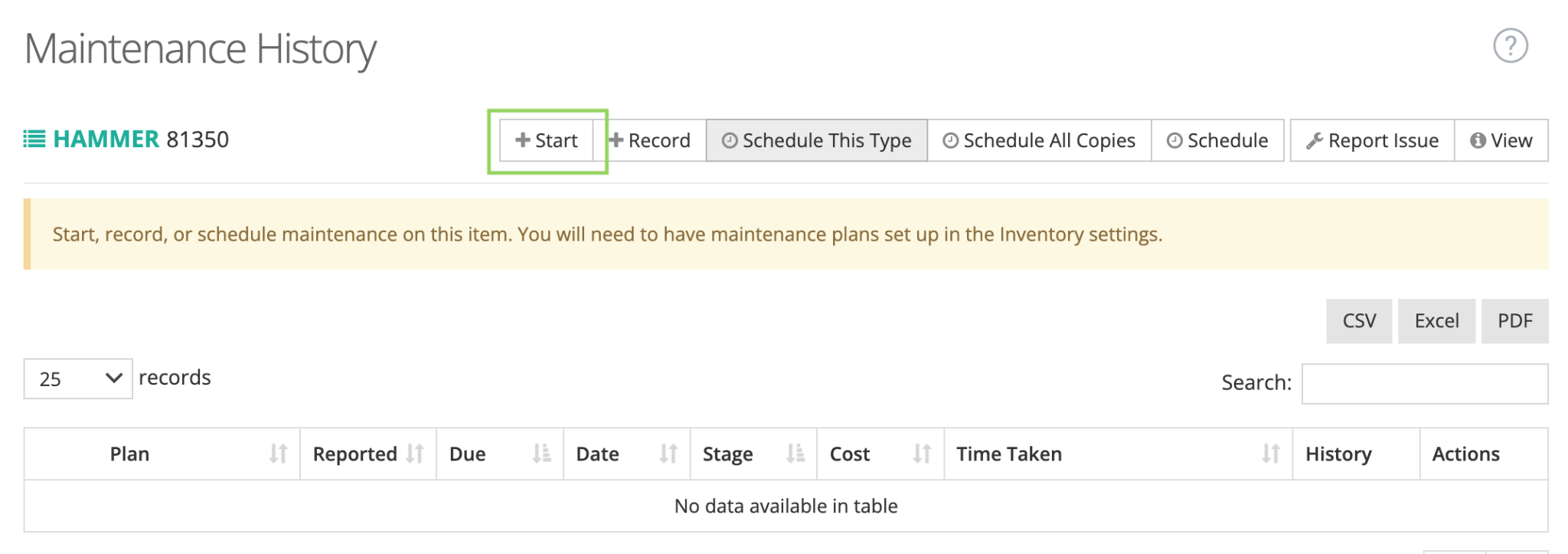
Starting Maintenance
Section titled “Starting Maintenance”Once you get the maintenance view:
Updating Maintenance
Section titled “Updating Maintenance”Update the existing maintenance log entry rather than creating a new one:

Make sure to add new information in the “Advanced” area: